Inquiry
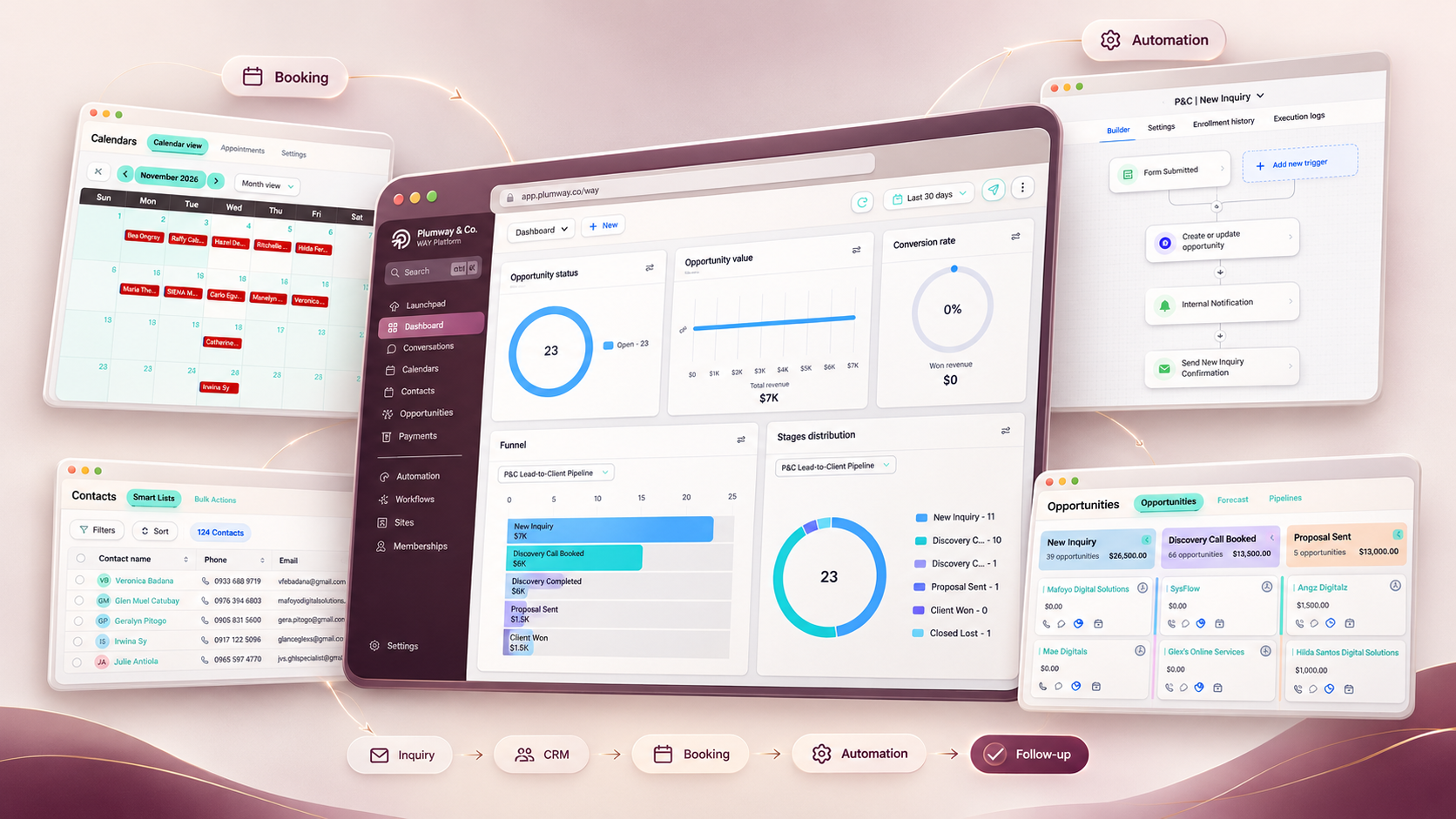
The lead enters one connected workspace.
Contact details, source information, and the initial conversation stay attached to the same customer journey.
Workflow Automation for You
WAY by Plumway & Co.
Your next inquiry should not become another thing your team has to chase.
WAY brings your contacts, conversations, appointments, opportunities,
lead capture, and follow-up into one connected workspace—so your team
can see what happened, what needs attention, and what should happen next.
Built for businesses that need a clearer path from inquiry to next action.
Where the Friction Starts
Most businesses do not choose a disconnected process. It grows one tool, inbox, spreadsheet, and workaround at a time.
Someone replies, but the rest of the team may not know what was said or what still needs to happen.
A calendar shows the booking, but not always the full context behind the inquiry or opportunity.
The business knows a lead exists, but ownership and next actions are not always obvious.
If someone forgets to follow up, the system does not always make the gap visible.
One person may capture the inquiry, another may book the appointment, and someone else may own the final conversation.
The Real Cost
The problem is not that your team is not working. It is that too much of the process still depends on people rebuilding the story manually.
That is when simple questions become harder than they should be: Did anyone reply? Who owns this? Was the appointment booked? Did we follow up? What happens next?
One Connected WAY
WAY keeps the key parts of the customer journey connected so the business does not have to rebuild context every time something changes.
Inquiry
Contact details, source information, and the initial conversation stay attached to the same customer journey.
Ownership
Assignment, notifications, and visibility help make responsibility clearer without relying on someone to pass the message manually.
Booking
Scheduling becomes part of the same process rather than another disconnected event sitting in a separate calendar.
Progress
Your team can see whether the lead is new, active, booked, waiting, progressing, or needs another conversation.
Follow-Up
Repeatable follow-up and reminders can support the process while keeping the moments that need a person visible.
What Changes
Instead of asking your team to remember the process, the process becomes easier to see.
That means fewer disconnected updates and clearer answers to the questions that matter: who owns this, where is it now, and what needs to happen next?
What’s Inside WAY
The tools matter—but the real value comes from keeping them connected around the same customer journey.
Explore the Workspace
Contacts
WAY gives your team a clearer view of the people behind the inquiry, along with the activity, communication, tags, appointments, and opportunities connected to them.
Conversations
Instead of rebuilding the conversation every time another team member steps in, communication stays closer to the customer record and the work happening around it.
Opportunities
Pipelines help turn scattered leads into visible stages so your team can distinguish what is new, progressing, waiting, won, lost, or overdue for another conversation.
Booking
Calendars and booking tools help connect scheduling to the contact, conversation, and opportunity so the team has more context around who is booked and what the appointment is for.
Automation
Workflows can support routine follow-up, assignment, notifications, reminders, tagging, and stage changes—while keeping the moments that require human judgment visible.
Lead Capture
Forms and inquiry points can connect directly to your customer process so a new lead becomes more than a notification sitting in someone’s inbox.
Websites & Funnels
Landing pages, forms, and conversion paths can work as part of the same connected system so the action a visitor takes can lead directly into the workflow your team uses.
The Difference
The value is not having more features. It is having fewer disconnected places where the customer journey can disappear.
Built Around the Business
The same platform can support very different journeys. What changes is the logic behind how the inquiry should move.
Home Services
A homeowner may call while the team is on-site, submit a form after hours, or ask for an estimate and need another conversation before booking. WAY can help connect those moments so the opportunity does not disappear after the first response.
Lead and inquiry details enter the workspace.
The team can see who needs to respond.
The appointment remains tied to the opportunity.
Follow-up supports the next conversation.
Dental Clinics
A new patient may ask about treatment, availability, or a consultation without booking immediately. WAY can help keep the inquiry, booking status, reminders, and follow-up connected around the same patient journey.
Reason for contact and details are captured.
The patient can move toward the right booking.
Routine communication does not need to start manually.
The team can see when a person still needs attention.
Real Estate
Buyers and sellers do not all move at the same speed. WAY can help organize the lead, qualification, ownership, booking, and longer-term follow-up around where the prospect actually is in the decision process.
Lead information enters the connected workspace.
Timing and intent help shape the next action.
The right person becomes responsible for the relationship.
Active and longer-term prospects do not need the same cadence.
Same Platform. Different Logic.
The technology can stay connected while the customer journey reflects the business using it.
Automation With Judgment
Good automation should make routine work easier without hiding the moments where context, judgment, and a real conversation matter.
See the Handoff
New Inquiry
A repeatable intake does not need to begin from scratch every time. WAY can support the predictable steps while making the new opportunity visible to the right person.
Appointment
WAY can support the repeatable scheduling work so the team has more attention available for the appointment itself.
Customer Replies
A real reply changes the situation. The system should support visibility and handoff rather than continuing blindly through a sequence.
No Response
When the next action is predictable, WAY can help the business stay consistent without creating another manual reminder.
Needs Attention
When something changes, goes off-script, or requires judgment, the most useful automation may simply be making that moment impossible to miss.
The Principle
Automation should remove unnecessary effort. It should not remove judgment from the moments where judgment matters.
Platform + Implementation
Software can provide the workspace. It still needs a clear process, deliberate configuration, and the right operating logic behind it.
WAY
WAY brings the tools needed to capture, organize, communicate, schedule, track, and support follow-up around the same customer journey.
Plumway Implementation
Plumway looks at the business process first, then builds the structure, logic, automation, and handoffs around how the team should operate.
Better Together
A connected platform is useful. A connected platform built around a clear operating process is far more valuable.
Request WAY Access
You do not need to have your entire automation strategy figured out before taking the next step.
A Good Fit for WAY
WAY is especially useful when the team is already doing the work, but too much of the customer journey still depends on manual checking, scattered tools, and remembering what should happen next.
What Happens Next
No need to arrive with a finished workflow map. Start with the problem you are trying to solve.
Start With the Process
You do not need another tool to manage. You need a system that makes the next action easier to see.
Frequently Asked Questions
You do not need to understand every feature or know exactly what should be automated before starting. These are the questions that usually matter first.
WAY is the connected workspace. Plumway helps shape how it should work around your actual business process.
WAY stands for Workflow Automation for You. It is a connected business workspace that can bring together customer records, conversations, appointments, opportunities, lead capture, follow-up, automation, and customer-facing pages around the same customer journey.
Plumway currently focuses on home services, dental clinics, and real estate businesses. The platform itself is flexible, but the workflow should still be designed around how your specific business handles inquiries, appointments, opportunities, and follow-up.
Not necessarily. The goal is not to replace tools just for the sake of consolidation. We first look at what your team already uses, where information becomes disconnected, and which parts of the process would benefit from being brought into one connected system.
WAY provides the platform. Custom process design, configuration, workflows, testing, documentation, and implementation are scoped separately through Plumway. This keeps the software itself separate from the strategic work required to build it properly around your business.
Yes. Plumway implementation can include process mapping, platform configuration, workflow and automation design, customer journey structure, testing, documentation, handover, and post-launch support depending on the scope of the project.
In many cases, existing tools may remain part of the setup depending on compatibility and the business process. During implementation, we look at what should stay, what should connect, and what may be creating unnecessary duplication or friction.
Platform usage, messaging, phone services, integrations, and other third-party costs may carry separate fees depending on what your setup uses. Any applicable costs should be clarified as part of the recommended setup before implementation.
You will share some initial context about your business and current process. From there, we can look at whether WAY is a good fit and what the appropriate next step may be for platform access, implementation, or a more detailed systems conversation.
No. In fact, it is often better to begin with the process problems: where work gets delayed, where information becomes difficult to find, where follow-up is inconsistent, and where your team spends time repeating the same manual actions. The automation decisions can come after the process is clear.
Still Not Sure?
You do not need to diagnose the system before reaching out. Start by showing us where the work gets harder than it should be.
Your Next Step
If inquiries, appointments, conversations, opportunities, and follow-up
are creating more manual work than they should, start by showing us
where the process breaks down.
We will look at the process first—then determine what the system
should actually do.
WAY is the platform. Plumway builds the process around it.
 Plumway & Co.